
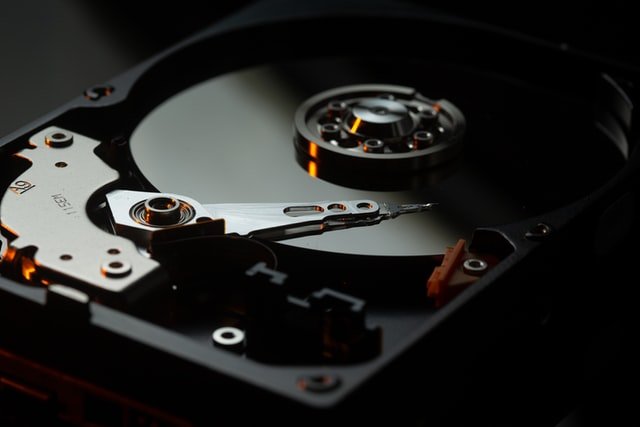
Traditional hard disk drives contain delicate mechanical machinery with rapid moving parts that can cause major headaches when things go wrong. If you have ever wondered what actually happens during a hard drive failure, the root cause usually boils down to mechanical wear or sudden physical trauma. Powering down the machine immediately upon suspecting an issue is the single best way to prevent total data loss instead of trying to restart it.
Before breaking down failure symptoms, it helps to understand what a hard disk actually is under the hood. We are talking specifically about the spinning magnetic hard drives found in many desktop computers and older laptops. Even though solid state storage has gained immense popularity, mechanical drives still handle heavy storage duties worldwide. If you want to dig deeper, our guide on How to Choose the Right Lawyer for Your Legal Needs covers this well.
Storage engineering has come a long way since IBM debuted the first disk drive back in 1956, leading to massive capacities packed into compact enclosures. Yet, the core operational physics remain identical across modern desktop models. Understanding these baseline mechanics helps explain why failure can happen so abruptly.
What are the Best Hard Drives?
Each hard disk relies on one or more rigid magnetic platters joined by a central axis rotating at speeds ranging from 5400 to 7200 revolutions per minute. As you research how to fix hard drive errors or look for reliable hardware upgrades, you will notice these rotational speeds dictate everyday performance. Keeping your system optimized is just as important as upgrading hardware, much like knowing what to look for when buying refurbished electronic equipment for a secondary workstation.
Suspended above every platter surface is a tiny read or write head that never actually touches the magnetic medium. Instead, it floats on a microscopic cushion of air generated by the spinning disks themselves. This engineering marvel allows modern drives to read vast amounts of data at lightning speeds until something disrupts the balance.
The Best Hard Drives to Buy Now
Even though cloud storage is everywhere, physical hard drives remain irreplaceable for managing massive local media libraries. When your storage capacity fills up with large photo archives, video projects, and local backups, mechanical drives offer cost-effective space. When a hard drive begins to fail, the underlying problem usually falls into one of two distinct categories.
Logical failures happen when the physical components are entirely undamaged, but the drive cannot locate its data due to corrupted file systems or accidental formatting. In these instances, the underlying files still exist on the platters unless new data writes over them. You can learn more about how data recovery professionals handle these tricky logic issues without destroying your files.
Mechanical failures are far more destructive because physical damage occurs inside the sealed enclosure. A classic example is a head crash, where the read head strikes the spinning platter surface with enough force to permanently gouge the magnetic coating. Other mechanical breakdowns include spindle motor failure or actuator arms losing their precise microscopic alignment.
Industry statistics indicate that logical issues account for roughly 20 percent of traditional hard disk losses, while physical hardware failures make up the remaining 80 percent. Reader head degradation and motor burnout top the list of physical culprits in modern failure predictions. Ignoring early warning signs like grinding noises or sudden file corruption almost always guarantees a complete hardware crash.
Physical shocks are a primary enemy of spinning disks because the internal tolerances are measured in microns. Dropping a running laptop or bumping a desktop tower can instantly send the read head crashing into a platter. Keeping your computer completely stationary while powered on is one of the easiest ways to prevent this fate.
Electronics inside the drive can also fail due to power surges, faulty power supplies, or chronic overheating. If your computer runs hot for extended periods, the internal controller board can warp or short out. Utilizing proper case ventilation and clean power strips keeps these electronic failures at bay.
Repairs Your Broken Hard Drive Bad Sectors
Attempting professional repairs on a severely damaged hard drive often results in expensive cleanroom laboratory fees. Rescuing data from a shattered spindle or gouged platter is rarely a one hundred percent success story. Following advice from specialized data recovery technicians helps you avoid catastrophic failures before they happen:
- Handle any computer or external enclosure containing a mechanical hard drive with extreme caution.
- Avoid moving or shifting your desktop PC or laptop while the internal storage drive is powered on.
- Protect your computer from chronic overheating by cleaning out dust filters and checking cooling fans regularly.
- Maintain frequent local and cloud backups so a hardware crash never catches you off guard.
Frequently Asked Questions
What are the first signs that a hard drive is failing?
Common warning signs include extremely long program load times, frequent blue screens, missing files, and strange clicking or grinding noises from the computer case. You might also notice SMART warnings popping up in your operating system.
Can I repair a broken hard drive myself?
Opening a hard drive outside of a sterile cleanroom environment will instantly ruin the platters with dust particles. Physical repairs require specialized laboratory equipment and trained technicians.
What is the difference between logical and mechanical failure?
Logical failure involves software corruption or accidental file deletion where the hardware is fine. Mechanical failure involves broken physical parts like read heads, motors, or damaged platters.
How often do hard drives fail?
Failure rates vary depending on age, operating temperature, and brand quality, but mechanical drives experience higher failure rates as they surpass three to five years of continuous use.
What should I do if my hard drive starts making clicking noises?
Power down your computer immediately to prevent further physical damage to the platters. Restarting the machine will only worsen the scratch damage and jeopardize your chances of recovering files.